
A website cookie is a small text file your browser stores so a site can remember who you are between page loads. Cookies keep you logged in, hold your basket contents, and let analytics tools track behaviour across visits, but non-essential ones require your consent under UK law. You can view, block, or delete them at any time through your browser settings.
TL;DR:
- Most browsers now treat cookies with stricter default settings, such as
SameSite=Lax, to reduce cross-site tracking and enhance security.- Clearing cookies alone often leaves local storage and IndexedDB data intact, so full privacy resets require clearing all site data through browser settings.
- Accepting all cookies without notice can undermine privacy, especially if consent banners are designed with dark patterns to push for acceptance.
- Using
Secure,HttpOnly, andSameSiteattributes on cookies significantly improves their security and minimizes account hijacking risks.- Employing partitioned cookies and clear consent preferences helps balance website functionality with user privacy expectations.
Table of Contents
- What cookies are and how they work
- Cookie attributes that control scope and security
- The main types of cookies you’ll encounter
- What cookies actually do on the sites you use
- Why cookies raise privacy and security concerns
- How different browsers handle cookies today
- How to check, clear and manage your cookies
- Cookie consent and the UK’s legal requirements
- Developer approaches to cookies and site storage
- A quick checklist for everyday browsing
- Why transparent cookie practice pays off commercially
- The gap between compliant cookies and cookies that build trust
- Sources
What cookies are and how they work
The web’s underlying protocol, HTTP, has no memory. Every request a browser sends to a server arrives as a blank slate, with no built-in way to know that the person requesting page two is the same person who just logged in on page one. Cookies exist to solve exactly that problem.
A cookie is a small text file stored by your browser, created when a server includes a Set-Cookie instruction in its response. That instruction might read something like session_id=8f3a2b; Expires=Wed, 09 Mar 2026 10:00:00 GMT. Your browser stores that value, then automatically attaches it to a Cookie header on every subsequent request to that same domain. The server reads it back, recognises the session, and serves you a page that reflects your logged-in state or your basket contents.
Picture an online shop. You add a jumper to your basket, then browse to another page. Without a cookie, the server would have no idea the jumper belongs to you. It would forget the moment you clicked away. The cookie carries that small piece of context along with every request, turning a stateless exchange into something that feels continuous.
Storage limits are modest by design. Most browsers cap individual cookies at around 4KB and limit the total number per domain, typically to 50 or so, though this varies by browser. That ceiling matters because cookies travel with every HTTP request, so bloated cookies slow every page load on a site.
This is also why cookies differ from newer storage mechanisms:
- Cookies are sent to the server automatically with every request, which makes them useful for identity but expensive at scale.
- LocalStorage holds larger amounts of data (typically up to 5 to 10MB) entirely on the browser side, never transmitted to the server unless your code explicitly sends it.
- IndexedDB goes further still, storing structured data for offline apps or complex client-side state, again without touching the network by default.
A site that needs to remember your login uses a cookie. A site that needs to cache a large dataset for offline use is far better served by IndexedDB. Confusing the two is a common developer mistake, and it’s one reason some sites feel sluggish: they’re pushing data through cookies that should never have left local storage.
Cookie attributes that control scope and security
Every cookie carries a set of attributes that determine where it’s sent, how long it lasts, and who can read it. These attributes are largely invisible to you as a visitor, but they decide whether a cookie is a minor convenience or a genuine security liability.
MDN’s cookie documentation sets out the core attributes clearly:
- Secure ensures the cookie is only sent over HTTPS connections, never in plain text over an unencrypted link.
- HttpOnly blocks JavaScript from reading the cookie at all, which closes off a common attack route where malicious scripts try to steal session data.
- SameSite controls whether a cookie is sent on cross-site requests.
Strictmeans the cookie only travels within the same site;Laxallows it for top-level navigation like clicking a link;Nonepermits it everywhere, but only when paired withSecure. - Domain and Path define exactly which part of a site can receive the cookie. A cookie scoped to
Domain=shop.example.comandPath=/checkoutwon’t be sent toblog.example.comor to/help. - Expires and Max-Age set the lifespan. Omit both and you get a session cookie, deleted when the browser closes. Set either and you get a persistent cookie that survives restarts, sometimes for years.
Developers also use naming prefixes as a defence-in-depth measure. Cookies prefixed with __Secure- or __Host- enforce additional restrictions in supporting browsers, such as mandating the Secure flag or preventing the cookie being set from a subdomain other than the one serving it. It’s a small naming convention that closes off a surprising number of misconfiguration bugs.
Pro Tip: Open your browser’s developer tools, go to the “Application” or “Storage” tab, and look at the SameSite column for any site you use regularly. If you see a login cookie marked SameSite=None without Secure, that’s worth flagging to the site, because it’s a configuration a security-conscious developer would normally avoid.
The SameSite attribute deserves particular attention because it changed browser defaults industry-wide. Chrome and Firefox now treat cookies as Lax by default when no SameSite value is specified, a shift designed to reduce cross-site request forgery attacks without breaking most legitimate cross-site navigation. Explicit SameSite settings are now considered standard practice precisely because relying on browser defaults, which vary and evolve, is a fragile way to secure a session cookie.
The main types of cookies you’ll encounter
Cookies fall into a handful of practical categories, and knowing which is which helps you decide what’s worth accepting.
- Session cookies exist only for the duration of your visit. Close the browser and they’re gone. A shopping basket that empties itself overnight is usually a session cookie at work.
- Persistent cookies carry an expiry date and survive browser restarts. A “remember me” login checkbox relies on one of these, sometimes lasting weeks or months.
- Authentication cookies store a session token proving you’ve logged in. These are typically classed as strictly necessary, which is why cookie banners usually don’t ask permission for them.
- Tracking and advertising cookies record browsing behaviour, often across multiple unrelated sites, to build a profile used for ad targeting or retargeting campaigns.
- First-party cookies are set by the domain you’re actually visiting. Third-party cookies are set by a different domain entirely, usually an advertising network or analytics provider embedded in the page, and this distinction is the single biggest factor in how much cross-site tracking a cookie enables.
- Partitioned cookies (CHIPS) are a newer category: each top-level site gets its own separate copy of a third-party cookie, so an embedded widget can still remember state on each site without that data being linked across sites. This preserves functionality, such as a chat widget staying logged in, while closing off the tracking angle.
- Super cookies and zombie cookies are the outliers worth knowing about. A super cookie exploits browser or network-level storage outside the normal cookie jar to persist even after you clear cookies; a zombie cookie is one that respawns itself using backup data stored elsewhere, such as in Flash storage or a cached script. Both are considered bad practice and are increasingly blocked by modern browsers, but they’re a useful reminder that “I cleared my cookies” doesn’t always mean a site has forgotten you.
What cookies actually do on the sites you use
Nearly every convenience you take for granted on the modern web depends on a cookie doing its job quietly in the background.
- Session management keeps you logged in as you move between pages and lets an online shop remember what’s sitting in your basket, even if you wander off to check reviews on another tab.
- Personalisation cookies store preferences such as language, currency, or a dark-mode toggle, so the site doesn’t reset to defaults every time you return.
- Analytics cookies, whether first-party (measuring your own site’s traffic) or third-party (feeding data to an external platform), tell a site owner which pages people actually read and where they drop off. A tool like heatmap tracking builds on this same cookie-based foundation to show exactly where visitors click and scroll.
- Advertising and retargeting cookies are usually third-party, following you from a product page on one site to a banner ad on an entirely different one days later.
- Embedded services, such as a video player, a payment widget, or a live chat box, often rely on their own cookies to function correctly, which is part of why blocking all third-party cookies can occasionally break a page in ways that aren’t obvious at first glance.
The trade-off is rarely all-or-nothing. A first-party analytics cookie measuring how long people spend on your pricing page is a fundamentally different proposition, privacy-wise, from a third-party advertising cookie logging your visits across fifty unrelated sites. Treating both the same way, as many blanket “accept all” banners encourage you to do, obscures a distinction that actually matters.
Why cookies raise privacy and security concerns
Third-party cookies are the mechanism behind most cross-site profiling online. Because the same advertising network can be embedded on thousands of unrelated sites, it can watch a single browser move between a news site, a retailer, and a forum, stitching those visits into a profile of interests, habits, and likely purchase intent. No single site sees the whole picture, but the network in the middle does, and that’s the practice that has drawn the most regulatory scrutiny over the past decade.
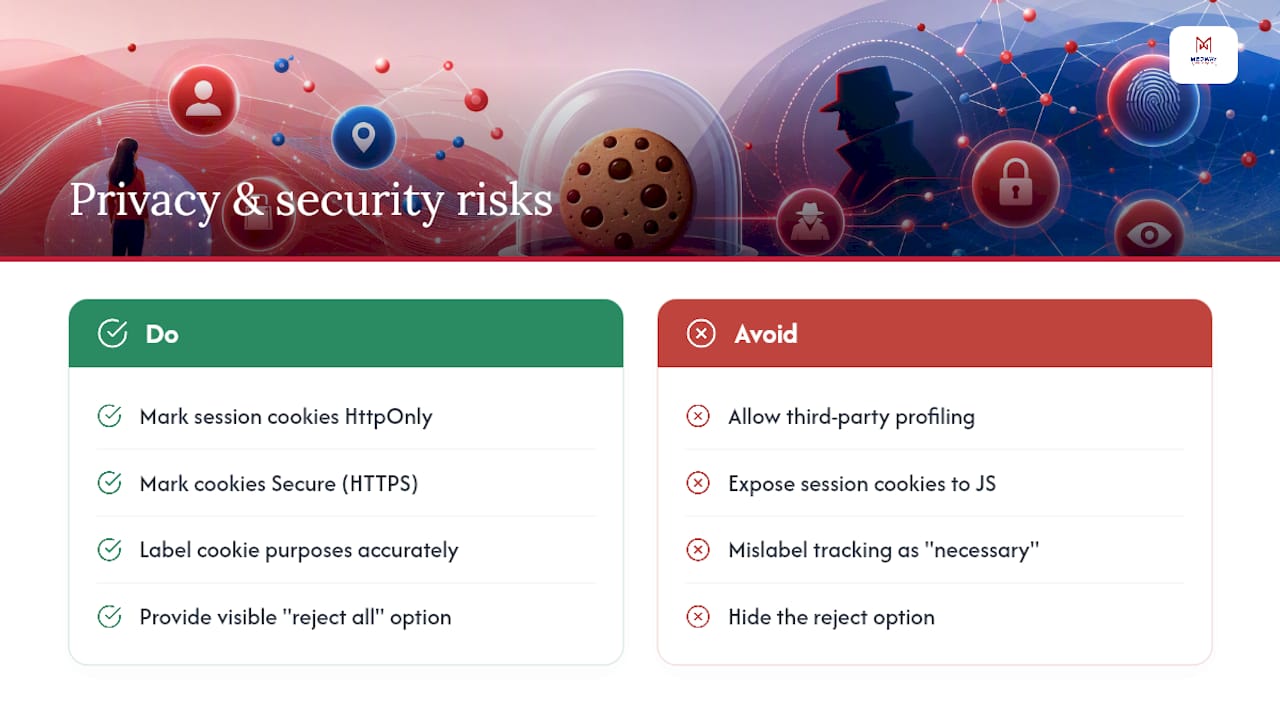
There’s a security dimension too, separate from the privacy one. Session cookies are, in effect, keys to your logged-in account. If an attacker can read that cookie, through a cross-site scripting (XSS) vulnerability on a poorly secured site, for instance, they can potentially hijack your session without ever knowing your password. This is precisely why the HttpOnly attribute matters: a cookie marked HttpOnly simply cannot be read by the JavaScript running on the page, which closes off the most common route an XSS attack would use to steal it.
A cookie that isn’t marked
SecureandHttpOnlyisn’t just a missed configuration checkbox. It’s a session token sitting somewhere a malicious script or an unencrypted connection could potentially intercept it. For a login cookie specifically, that gap is the difference between a minor oversight and a genuine account takeover risk.
There’s also a trust and compliance risk that gets less attention than the technical one. Mislabelling advertising or analytics cookies as “strictly necessary” on a consent banner, so that they load before the visitor has made any choice, remains a common trap that regulators specifically flag. It’s understandable why a site owner might do it, since granular consent tends to lower opt-in rates for advertising, but it’s the kind of shortcut that damages both compliance standing and visitor trust once spotted.
Pro Tip: If a cookie banner’s “accept all” button is a bright, obvious colour and “reject all” is a grey, barely visible text link buried in a submenu, that’s a design choice, not an accident. Treat it as a signal about how the rest of the site treats your preferences.
This is exactly why modern browsers increasingly block or partition third-party cookies by default rather than leaving the decision entirely to individual sites. It’s not a purely regulatory response. It reflects a recognition that the profiling made possible by unrestricted third-party cookies had simply outpaced what most visitors understood or expected when they clicked “accept.”
How different browsers handle cookies today
Browser behaviour on cookies has diverged sharply over the past few years, and which browser you use now genuinely changes what a website can see about you.
- Safari has run Intelligent Tracking Prevention for years, blocking third-party cookies by default and limiting how long even first-party cookies can persist if Safari judges them likely to be used for tracking.
- Firefox uses Total Cookie Protection, which doesn’t block third-party cookies outright but partitions them, giving each site its own separate cookie jar for any embedded third-party content, so a tracker can’t link your activity across sites even if it’s technically present on several of them.
- Brave blocks third-party cookies and a wide range of trackers by default, going further than most mainstream browsers out of the box.
- Chrome has taken a different path. After several delayed deadlines, Chrome’s approach to phasing out third-party cookies has shifted toward giving users more granular control rather than a single blanket removal, though the direction of travel across the industry remains firmly toward restricting third-party tracking by default.
Partitioning, rather than outright blocking, is increasingly the preferred approach because it preserves functionality. A chat widget or a payment form embedded from another domain can still work correctly on each site individually, it just can’t use that cookie to recognise you across different sites, which is exactly the tracking use case partitioning is designed to close off.
If a feature on a site suddenly stops working, an embedded video that won’t play, a single sign-on button that fails silently, it’s often third-party cookie blocking at fault rather than a bug in the site itself. Most browsers let you grant an exception for a specific site through the address bar’s site information panel or through a dedicated exceptions list in settings, without disabling cookie protections everywhere else.
How to check, clear and manage your cookies
Taking control of your cookies doesn’t require any technical expertise, just a few minutes in your browser’s settings.
- Open your browser’s privacy settings. In Chrome, Firefox, Safari, and Edge, this is usually under Settings, then Privacy and Security, where you’ll find options to view, block, or clear cookies by category.
- Choose a blocking level that suits you. Most browsers offer a middle ground, blocking third-party or tracking cookies while leaving first-party ones alone, which keeps sites functional without allowing cross-site profiling.
- Clear cookies for a specific site, or all sites, from the same menu. This is usually the fastest fix if a site is behaving oddly or has become slow to load.
- Remember that clearing cookies alone doesn’t clear everything. Other storage mechanisms like localStorage and IndexedDB often survive a standard cookie clear, so if you’re trying to fully reset a site’s memory of you, look for a “clear all site data” or “clear site settings” option instead.
- Use your browser’s developer tools for a quick audit. Right-click any page, choose “Inspect,” and open the Application or Storage tab to see every cookie a site has actually set, including its expiry and SameSite value.
Pro Tip: If you only remember one setting, make it this: most browsers let you block third-party cookies by default while still accepting first-party ones. That single toggle removes the bulk of cross-site advertising tracking without breaking logins or shopping baskets on the sites you actually use.
Cookie consent and the UK’s legal requirements
UK law is specific about what counts as valid consent for cookies, and it’s stricter than most banners let on. Under PECR, website operators must inform visitors and obtain active, informed consent before setting any non-essential cookie, which covers most analytics, advertising, and personalisation cookies. Strictly necessary cookies, such as those managing your login session or basket, are exempt from this requirement because the site genuinely cannot function without them.
Active consent means a clear, positive action, ticking a box or clicking an explicit “accept” button, rather than simply continuing to browse the site. Continuing to scroll past a banner is not consent under current ICO guidance, even though plenty of older banners were designed around that exact assumption.
The EDPB has gone further still on the question of cookie walls, guidance that blocks all access to a site’s content unless the visitor accepts cookies. Making content conditional on consent in this way can invalidate that consent entirely, because consent is only meaningful when it’s freely given, and a wall that offers no real alternative isn’t free in any meaningful sense.
For UK readers, a few practical points follow:
- You have the right to refuse non-essential cookies and still access a site’s core content in most cases.
- A compliant banner should let you change your choice later, usually via a small settings icon or a link in the footer, not just at first visit.
- Complaints about non-compliant cookie practices in the UK can be raised with the Information Commissioner’s Office, the regulator responsible for enforcing PECR.
Developer approaches to cookies and site storage
For anyone building or commissioning a website, cookies are only one tool among several, and choosing the right one for the job matters as much as configuring it securely.
- Reach for Web Storage APIs or IndexedDB instead of cookies when storing larger amounts of client-side data that the server doesn’t need on every request, such as a draft form or a cached product catalogue for offline browsing.
- Use CHIPS (partitioned cookies) or the Storage Access API for embedded widgets that need to remember state per site without enabling cross-site tracking. This is increasingly the standard pattern for chat tools, comment systems, and payment embeds.
- Audit for
SameSite=Noneusage. Searching a codebase for that specific setting is a practical first step toward identifying which cookies genuinely need cross-site behaviour and which were simply left permissive by default. - Apply
SecureandHttpOnlyto every session or authentication cookie as a baseline, and consider the__Host-prefix for an added layer of enforcement in supporting browsers. - Build consent banners with genuine granularity, separating analytics, advertising, and functional categories rather than offering a single “accept all” toggle that hides the real choice being made.
A quick checklist for everyday browsing
Handling cookie banners doesn’t need to eat your afternoon. A few habits cover most of what matters.
- Look for a “manage preferences” or “reject non-essential” option before defaulting to “accept all.”
- Accept cookies freely on sites you trust and use regularly, where the convenience of staying logged in outweighs the tracking trade-off.
- Refuse non-essential cookies on one-off visits to sites you won’t return to.
- Clear cookies periodically, and check “all site data” if you want a genuine clean slate rather than a partial one.
- Keep your browser updated, since most tracking protections improve with each release, and enable two-factor authentication wherever it’s offered, as a second layer of defence if a session cookie is ever compromised.
Why transparent cookie practice pays off commercially
Treat a cookie banner as a design decision, not a legal afterthought, and it starts working in your favour rather than against you. Visitors who are offered a genuine, granular choice, rather than a wall of grey text and a single oversized “accept” button, tend to trust the rest of the site more, and that trust shows up in conversion figures over time, not just compliance audits.

Good cookie UX isn’t separate from good web design generally. The same principles that make a checkout flow easy to follow, clarity, honest defaults, and an easy way to change your mind, apply directly to consent banners. MedwayWebDesign builds that granularity into site projects from the outset: separating analytics from advertising cookies, making “reject non-essential” as visible as “accept,” and giving visitors a permanent settings link rather than a one-time choice buried in a first-visit popup.
The gap between compliant cookies and cookies that build trust
Most guidance on this topic treats cookie consent as a checkbox exercise: get the legal wording right, ship the banner, move on. That’s a mistake, and it’s one I see repeated across otherwise well-built sites.
The businesses that get real value from their cookie practice are the ones that treat the banner as a first impression, not a formality. A visitor’s very first interaction with a site is often that consent prompt, arriving before they’ve read a word of actual content. Design it badly, with dark patterns steering people toward “accept all” or a maze of submenus to find “reject,” and you’ve told that visitor something about how the rest of the site will treat them, whether that’s true or not. Design it well, with a genuine choice presented plainly, and you’ve bought a small but real amount of goodwill before the visitor has even scrolled.
There’s also a technical laziness that consent banners tend to expose. Sites that mislabel advertising trackers as “strictly necessary” almost always turn out, on closer inspection, to have other configuration problems too, cookies without Secure flags, session tokens without HttpOnly, SameSite left at browser defaults rather than set deliberately. The banner is rarely the only symptom. It’s usually the most visible one.
My honest view is that browser-level enforcement, partitioning, ITP, Total Cookie Protection, has done more to fix bad cookie practice than most cookie banners ever will, simply because it removes the choice from the site owner entirely. But that shift makes deliberate, well-configured first-party data more valuable, not less. A site that earns explicit, informed consent for its analytics and personalisation cookies, and uses that data well, is building something a third-party tracker never could: a direct, trusted relationship with the people who actually use it.
— Ian Rickard
Sources
For readers who want the primary guidance rather than a summary, MDN’s cookie documentation covers the full technical detail on attributes and syntax. The ICO publishes the UK’s regulatory position on consent under PECR, while the EDPB’s guidelines address consent validity and cookie walls at a European level. For background on how communications and marketing teams typically approach cookies, CommsBuyer’s cookie explainer offers a useful non-technical overview. Most major browsers also publish their own help pages covering exactly how to clear cookies and site data step by step.